
PAN Card Photo Resize
You can apply for a PAN card in India through two portals and each one has different requirements. Before you resize your PAN card photo, confirm which portal you are using. Pick one portal and the tool will set the right size, resolution and file limit.
- 100% Private — No Uploads
- Fast & Free
- No Sign-up Needed
- Works on Any Device
Choose Your PAN Application Portal
You can apply for a PAN card in India through two portals and each one has different requirements. Before you resize your PAN card photo, confirm which portal you are using. Pick one portal and the tool will set the right size, resolution and file limit.
Which portal should I choose?
- Choose Protean (formerly NSDL) if you are applying through the Protean PAN portal.
- Choose UTIITSL if you are applying through the UTIITSL PAN portal.
- If unsure, check the website where you are submitting your PAN application.
Drag & drop your photo here
or browse files from your device
JPG or PNG, up to 15 MB. Nothing is uploaded — processing happens on your device.
Processing…
Common Reasons Your PAN Card Photo Gets Rejected
Uploading the wrong photo is one of the most common reasons PAN applications get delayed or returned. Here are the mistakes to avoid before you submit.
Wrong Size
You cannot upload any random photo for your PAN card application. Remember that a normal passport photo won't work either. Protean needs 197×276 px and UTIITSL needs 213×213 px.
File Size Is Too Big or Small
Protean allows photos up to 20 KB only and signatures up to 10 KB. UTIITSL allows photos up to 30 KB. In case you upload anything bigger than that, it will be rejected during upload.
Wrong File Format
It’s better to stick to JPEG or JPG images only. Both portals only accept these formats. A PNG, WebP, or HEIC file will fail validation – even if you just renamed it.
Blurry Or Low-Resolution Photo
You cannot just upload a blurry photo for your PAN application. A photo that is too compressed can be rejected in manual review – even if the file size is fine. Protean asks for 200 DPI and UTIITSL asks for 300 DPI.
Face Not Visible
Center your face and stand in a well-lit area. Your face should fill roughly 70–80% of the frame. No sunglasses. Dark shadows or a tilted head can also get the photo rejected – so keep your head straight. Head coverings are fine, but only if you wear them for religious reasons.
Wrong Background
Selfies are not accepted for any official work. Your PAN application should have a proper photograph. Selfies against coloured walls, furniture, or outdoors are often rejected. Both portals require a plain white background, proper lighting and no shadows.
Signature Problems
Your signature should be clear and easy to read. Always sign with black ink on white paper. If it touches the edges, looks faint or has marks around it – the portal may not accept it.
Old Or Different Photo
Use a recent photo on your application. Before you submit, take a quick look at the portal's latest instructions and make sure your photo and signature meet all the requirements.
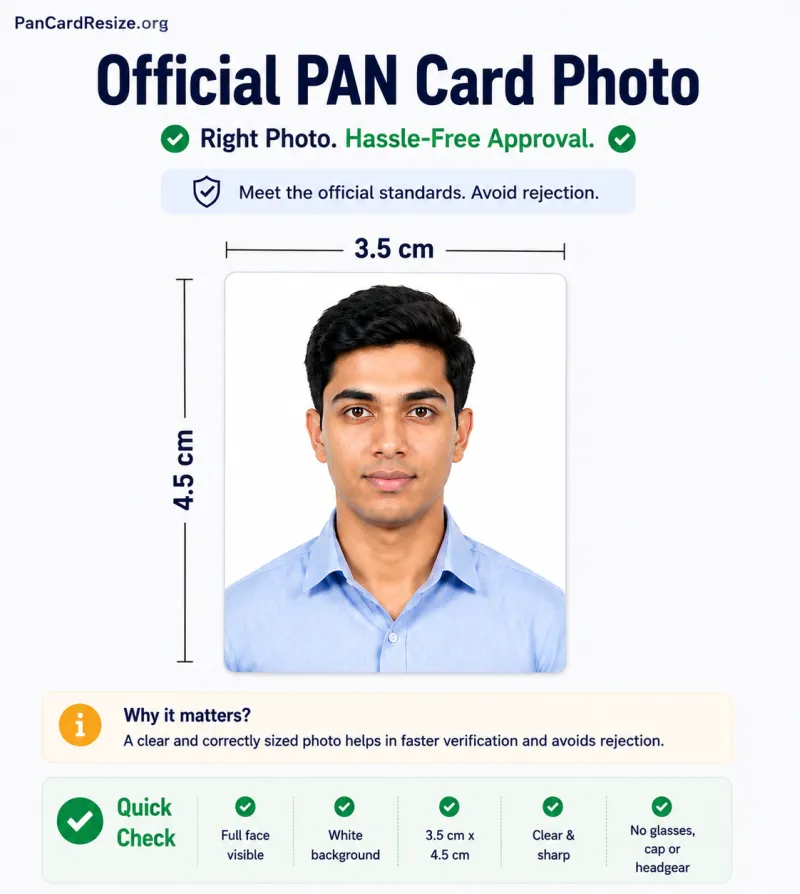
Use the PAN Card Photo Resize tool above to fix dimensions, DPI, format & file size instantly — free & private.
Official PAN Card Photo Size, Signature Size & File Requirements
India's two PAN card portals — Protean (formerly NSDL) and UTIITSL — have different technical requirements for photos and signatures. The table below lists the exact specifications so you know exactly what to prepare before you start your application. All values are sourced from the respective official portals.
Protean (formerly NSDL)
Online PAN Application via Protean eGov Technologies
| Specification | Photo | Signature |
|---|---|---|
| Dimensions | 197 × 276 px (3.5 × 2.5 cm) | 197 × 197 px (approx.) |
| Resolution | 200 DPI | 200 DPI |
| Format | JPEG / JPG | JPEG / JPG |
| Max File Size | 20 KB | 10 KB |
| Background | White / off-white | White paper |
| Ink / Colour | Colour photo | Black ink |
| Aspect Ratio | Portrait (taller than wide) | Landscape or square |
UTIITSL
Online PAN Application via UTI Infrastructure Technology and Services
| Specification | Photo | Signature |
|---|---|---|
| Dimensions | 213 × 213 px (square) | 213 × 71 px (approx.) |
| Resolution | 300 DPI | 300 DPI |
| Format | JPEG / JPG | JPEG / JPG |
| Max File Size | 30 KB | 10 KB |
| Background | White / off-white | White paper |
| Ink / Colour | Colour photo | Black ink |
| Aspect Ratio | Square (1:1) | Landscape (3:1 approx.) |
Specifications are based on official portal guidelines and may be updated by the portals without notice. Always verify on the official Protean or UTIITSL portal before submitting your application.
How to Resize a PAN Card Photo
All it takes is four simple steps. You don’t need to install anything or make an account. You can directly use this tool for resizing – it runs in your browser.
-
Pick Your Portal
You can choose between Protean or UTIITSL. The photo size and KB limit are already set for you.
-
Upload Your Photo
You will have to upload a JPG or PNG photo here. Or you can simply browse your device. Check whether your face is visible. No need to worry, as the photo is not uploaded to any server.
-
Resize The Photo
Move the crop box as required. Your face should sit in the middle of the frame. Try to keep your head straight and avoid leaving too much empty space around you. The size is set, change it only if you need to.
-
Download The Photo
Check the preview and confirm the size. After that, you can download it. Now you can upload it to your PAN application.
PAN Card Photo Requirements
Official photo specifications for the two PAN application portals. Click "Use this preset" to jump straight to the tool with these settings applied.
| Portal | Dimensions | Resolution | Max file size | Format | |
|---|---|---|---|---|---|
| Protean (formerly NSDL) | 3.5 × 2.5 cm (≈197 × 276 px) | 200 DPI | 20 KB | JPEG | |
| UTIITSL | 213 × 213 px | 300 DPI | 30 KB | JPEG |
Note: These figures reflect the specifications commonly published by each portal and may change over time. Always confirm the current pixel size, resolution, and KB limit on the official form before submitting — use the presets above as a reliable starting point.
Why Use This Pan Card Resizer Tool
Skip the guesswork of manually cropping and compressing your PAN card photo in an image editor. This tool applies the exact Protean or UTIITSL specifications automatically, so your photo is accepted on the first try.
Precise cropping
Drag-resize crop box with aspect ratio locked to your chosen output size — no distortion, ever.
Exact pixel dimensions
Type the precise width and height your form requires — down to the pixel.
Target file size (KB)
Set a maximum — and optional minimum — KB size. Automatic quality compression hits your target.
100% private
Your photo is processed with your browser's Canvas API and never leaves your device.
JPG & PNG support
Upload either format and export as JPG or PNG, whichever your form requires.
Light & dark mode
Automatically matches your system theme, with a manual toggle whenever you want.
Frequently Asked Questions
What size should a PAN card photo be?
It depends on which portal you're applying through. Protean (formerly NSDL) asks for 3.5 × 2.5 cm (≈197 × 276 px) at 200 DPI, under 20 KB. UTIITSL asks for 213 × 213 px at 300 DPI, under 30 KB. Choose your portal in the tool above and these values are applied automatically — always confirm against the current form, since requirements can change over time.
What's the difference between Protean (NSDL) and UTIITSL?
Protean eGov Technologies (formerly NSDL) and UTIITSL are the two agencies authorized to process PAN card applications in India on behalf of the Income Tax Department. Which one you use depends on which application form or website you started your PAN application on — each has its own photo specification, which is why this tool asks you to pick a portal before uploading.
What is the maximum file size allowed for a PAN card photo?
20 KB for Protean (formerly NSDL) and 30 KB for UTIITSL, based on each portal's published specification. This tool applies the right limit automatically once you choose your portal, and also lets you set a custom maximum (and optional minimum) KB target.
Is my photo uploaded to a server?
No. All cropping, resizing, and compression happens locally in your browser using the HTML5 Canvas API. Your photo is never transmitted over the network or stored anywhere outside your device.
Can I resize a photo without cropping it?
Yes. Set the crop box to cover the entire photo (drag its corners to the edges) before adjusting width, height, and target file size — the tool will then resize the full image instead of a cropped section.
Why is my photo still too large after compression?
If the file size still exceeds your target even at the lowest quality, the pixel dimensions are likely too large for that KB budget. Try reducing the width and height slightly, or increasing the target KB limit if your form allows it.
Which format should I choose, JPG or PNG?
Use JPG for PAN card and most government form photos — it compresses efficiently to hit small KB targets. PNG is lossless and generally produces larger files, so only use it if your form specifically requires PNG.
Can I use this tool on my phone?
Yes. The tool is fully touch-friendly and works on phones, tablets, and desktops in any modern browser.
Is this tool free to use?
Yes, it's completely free with no sign-up, watermark, or usage limit.
Troubleshooting
The download button is disabled
Check the status message above the preview — it usually means a field is invalid, such as a width/height below 20 px or a maximum KB of 0.
Compressed file still exceeds the KB limit
Reduce the crop area or the pixel dimensions slightly — smaller images compress to smaller file sizes at the same visual quality.
My photo looks blurry after resizing
This happens when the output size is larger than your cropped area (upscaling). Start with a higher-resolution source photo, or crop a larger region.
Drag/touch isn't moving the crop box
Make sure you're dragging from inside the crop box (not the dimmed background), and try updating your browser to the latest version.
Colors look slightly different after download
JPEG compression can subtly shift colors at very low quality/small KB targets. Try raising the maximum KB slightly for a cleaner result.
PNG file is larger than expected
PNG is lossless and doesn't support quality-based compression. Switch to JPG in the format selector for a much smaller file.